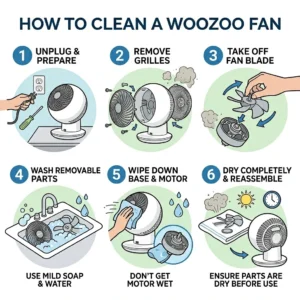
If you are looking for how to clean a Woozoo fan, the most effective way is to unplug it, carefully remove the front grill, clean the blades and inner frame, clear dust from the air intake and motor vents, and reassemble it once everything is fully dry. This approach restores stronger airflow, prevents dust from recirculating into your room, reduces strain on the motor, and helps the fan last longer.
Like most air circulators, Woozoo fans collect dust faster than many people realize. Dust builds up on the grill, blades, and rear vents, which can block airflow and make the motor work harder. Over time, this can lead to weaker airflow, extra noise, and dust spreading back into your room instead of clean air moving through it.
At Mesh Maids, we have cleaned and maintained hundreds of homes, and one thing we often notice is how easily fans become dust traps. From ceiling fans to compact air circulators, we have seen how regular house cleaning improves air flow and keeps your home feeling fresher. In this guide, we will show you the exact steps to clean your Woozoo fan safely, what to avoid during cleaning, and how to keep it working at its best.
Why You Need to Clean Your Woozoo Fan
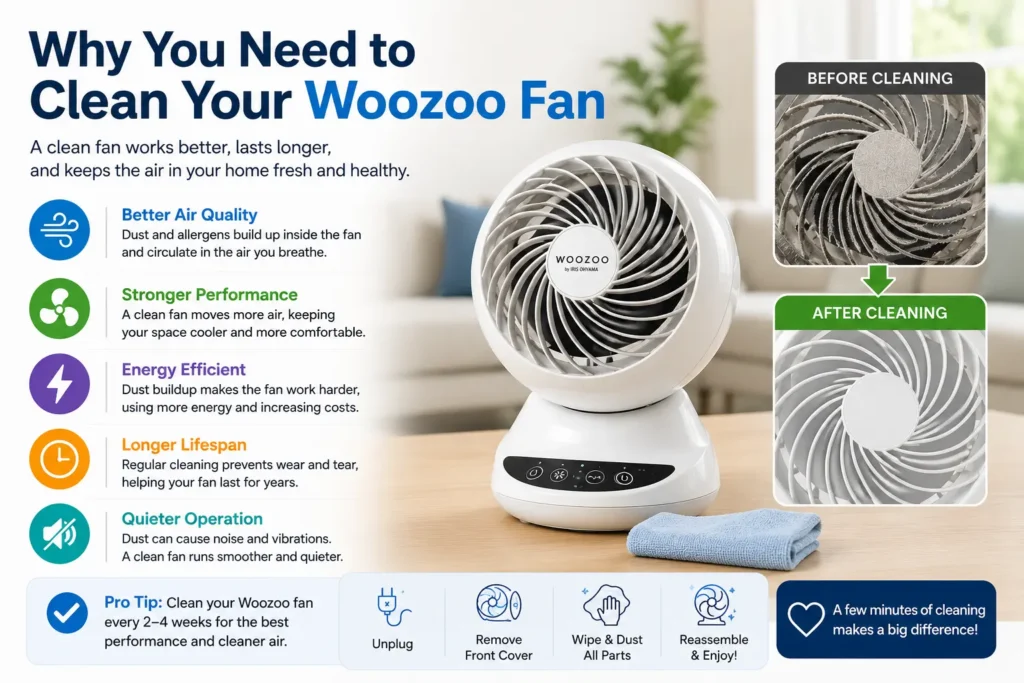
Regular cleaning is an important part of keeping your Woozoo fan working properly. Dust buildup makes the fan look dirty and also affects airflow, air quality, and overall performance. When dust collects on the blades, grill, and vents, your fan has to work harder to circulate air, which can reduce efficiency over time.
Better Airflow Performance
One of the biggest reasons to clean a Woozoo fan is to maintain strong airflow. Dust and debris collect on the fan blades and protective grill, creating a barrier that reduces air movement. This can make your fan feel less powerful even when it is running at the same speed.
When the blades and vents are clean, air moves more freely, helping your Woozoo fan circulate air efficiently and keep your room comfortable.
Improved Indoor Air Quality
A dirty fan does not just hold dust, it can push it back into your living space every time it runs. As the blades spin, trapped dust, pet hair, and airborne particles can spread around the room, affecting your indoor air quality.
This becomes even more important in homes with:
- Allergies or asthma concerns
- Pets that shed hair and dander
- Children who are more sensitive to dust
- High daily indoor activity
In our clients’ homes, we often see that Woozoo fans are almost neglected in their cleaning routine that can impact the freshness of home, especially in busy households.
Helps Extend the Fan’s Lifespan
Dust buildup around the motor vents can create extra strain on the fan’s internal parts. When airflow is blocked, the motor may work harder than it should, increasing wear over time and raising the risk of overheating.
Regular Woozoo fan cleaning reduces this strain, supports smoother operation, and can help extend the life of your fan.
Keeps Your Fan Running Quietly
If your Woozoo fan has become noisier than usual, dust buildup could be part of the problem. Dust on the blades can affect balance and create vibrations, which may lead to rattling or uneven spinning.
Cleaning the blades and inner parts helps the fan run more smoothly, improving performance while keeping operation quieter.
Safety Steps Before You Clean a Woozoo Fan
Before you start cleaning your Woozoo fan, it is important to follow a few basic safety steps to avoid damage to the unit and ensure safe handling. In proper home maintenance practice, we always prioritize safety first, especially when working with electrical appliances that contain motors and moving parts.
Turn Off the Fan Completely
Always switch off the Woozoo fan before starting any cleaning. This ensures the blades are fully stopped and prevents accidental movement while handling the grill or exterior parts.
Unplug the Power Source
Once the fan is turned off, unplug it from the electrical outlet. This is a critical step because cleaning or handling any appliance while it is connected to power increases the risk of electrical shock or accidental activation.
Allow the Motor to Cool Down
If the fan has been running recently, allow it to cool for about 10–15 minutes before cleaning. The motor area can retain heat after use, and giving it time to cool ensures safer handling and prevents unnecessary strain on internal components during cleaning.
Always remember, safe cleaning practices are always the foundation of proper appliance care. Taking these simple precautions before the risk-free process.
Tools You Need to Clean a Woozoo Fan
Having the right tools ready makes the process faster, safer, and more effective. In proper home appliance maintenance, using gentle and suitable cleaning tools is important to avoid damaging the grill, blades, or internal components while still removing dust buildup thoroughly.
Basic Cleaning Supplies to Clean Woozoo Fan
Soft microfiber cloth
Soft brush or cleaning brush
Vacuum with brush attachment
Mild dish soap
Warm water
Screwdriver (if required)
Compressed air (optional)
With these basic supplies, you can safely and effectively clean a Woozoo fan and maintain consistent airflow performance at home.
How to Clean a Woozoo Fan: Step-by-Step Guide for Better Airflow
To clean a Woozoo fan properly, you should follow a structured process that removes dust safely while protecting internal components. This helps restore airflow, improve efficiency, and maintain smooth operation over time.
Step 1: Move the Fan to a Safe Cleaning Area
Place the Woozoo fan in an open, easy-to-clean space such as a table, balcony, or garage. Make sure it is unplugged and completely switched off before starting. This prevents dust from spreading inside the home and allows comfortable access from all sides.
Step 2: Remove the Front Grill
Carefully detach the front grill. Depending on the model, it may twist off, unclip, or require a screwdriver. Handle it gently without forcing it, as different Woozoo fan designs use different locking mechanisms. Once removed, keep it aside for separate cleaning.
Step 3: Clean the Front Grill
Start by vacuuming the grill using a brush attachment to remove loose dust. Then wash it with warm water and mild dish soap. Use a soft brush to gently scrub between the gaps, rinse thoroughly to remove soap residue, and allow it to air dry completely before reassembly.
Step 4: Clean the Fan Blades
Wipe off loose dust using a dry microfiber cloth. Then clean both sides of each blade using a damp cloth with mild soap solution. Avoid bending the blades, as even slight damage can affect balance and airflow. Ensure the blades are fully dry before proceeding.
Step 5: Clean the Rear Grill
If removable, clean the rear grill using the same method as the front grill—vacuum, wash, rinse, and dry. If it is not removable, carefully vacuum and brush away dust buildup. This step improves air intake and overall performance.
Step 6: Clean the Motor Housing
Do not use water on this section. Wipe the exterior using a dry microfiber cloth, use a soft brush to loosen dust in vents, and apply compressed air if available to clear hidden particles. This helps maintain proper ventilation and prevents overheating.
Step 7: Clean the Base and Outer Body
Wipe the base and outer surface using a damp microfiber cloth to remove settled dust. Dry immediately to avoid moisture marks and maintain a clean finish.
Step 8: Reassemble the Woozoo Fan
Once all parts are fully dry, reattach the rear grill, secure the blades if removed, and lock the front grill back into place. Ensure all components are properly aligned and firmly secured.
Step 9: Test the Fan
Plug in the fan and turn it on. Check for strong airflow, smooth rotation, quiet operation, and no vibration. If performance is restored, the Woozoo fan cleaning process has been completed successfully.
Following this step-by-step process ensures your Woozoo fan runs efficiently, delivers better airflow, and maintains longer durability with regular maintenance.
How Often Should You Clean a Woozoo Fan?
The frequency of Woozoo fan cleaning depends on how often the fan is used and the environment it operates in. In real home conditions, dust buildup can vary significantly based on airflow, pets, and indoor air quality, so adjusting your cleaning schedule helps maintain better performance and cleaner air circulation.
Light Use
If the Woozoo fan is used occasionally, cleaning it every 2–3 months is usually sufficient. In lighter usage environments, dust accumulates slowly, but regular maintenance is still important to prevent hidden buildup on blades and grills.
Daily Use
For fans that run every day, it is best to clean the Woozoo fan once a month. Continuous use increases dust collection on internal components, which can gradually reduce airflow and efficiency if not cleaned regularly.
Homes With Pets
In homes with pets, cleaning should be done every 2–4 weeks. Pet hair and dander circulate quickly in the air and tend to stick to fan blades and grills, leading to faster buildup and reduced airflow performance.
You can also go for pet-friendly cleaning.
Allergy-Sensitive Homes
In environments where air quality is especially important, such as homes with allergy or asthma concerns, it is recommended to clean the fan every 2 weeks. Frequent cleaning helps reduce airborne dust circulation and supports a cleaner indoor environment.
We always guide our customers to follow the right cleaning schedule to ensure Woozoo fan continues to deliver strong airflow, quieter operation, and improved air quality throughout its use cycle.
Common Mistakes to Avoid When Cleaning a Woozoo Fan
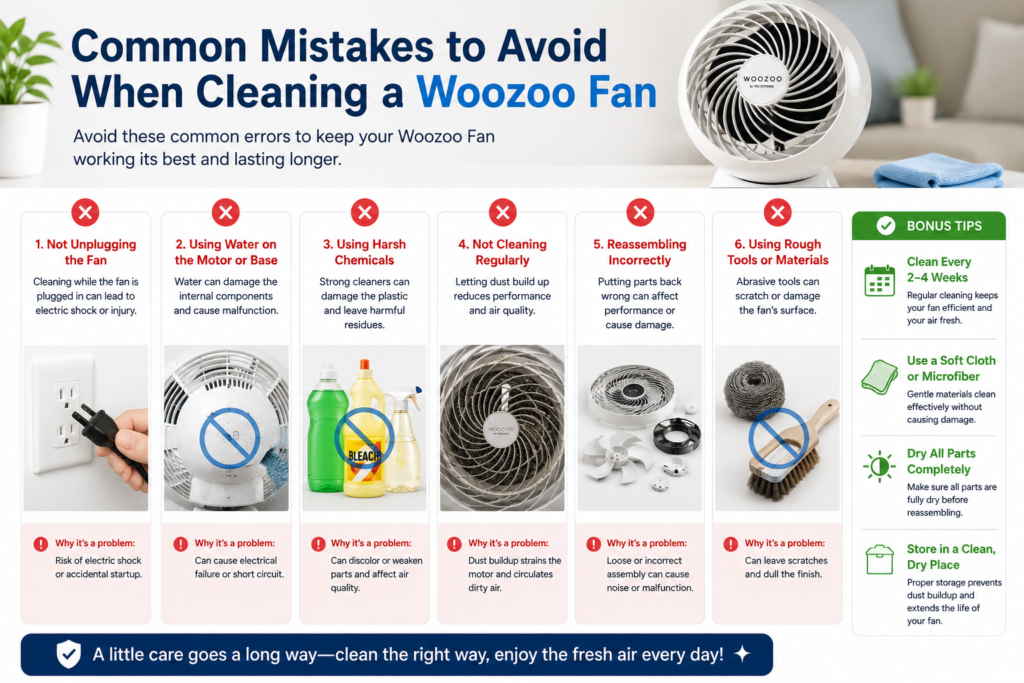
When you clean a Woozoo fan, the method you use directly impacts its performance and safety. From professional home maintenance experience, we know that most post-cleaning issues come from a few avoidable mistakes. Being mindful of these ensures better airflow, longer durability, and safer operation.
Using Too Much Water
One of the most common mistakes is using excess water during cleaning. Moisture can easily reach the motor or internal components and cause damage. We always suggest using a lightly damp microfiber cloth instead of soaking any part of the fan. This is enough to remove dust without risking electrical issues.
Forcing Parts To Get Open
Woozoo fan grills and locking systems vary by model, and forcing them open can break clips or misalign components. Always open parts gently and follow the natural mechanism—twist, unlock, or unscrew—without applying pressure.
Using Harsh Cleaning Chemicals
Strong cleaners, bleach, or abrasive solutions can damage the plastic surface and weaken internal parts over time. A mild solution of warm water and dish soap is more than enough to safely remove dust and grime without affecting the material finish.
Reassembling Before Everything Is Dry
Reassembling the fan while any part is still wet can trap moisture inside the unit. This is one of the most overlooked mistakes and can affect internal safety and performance. Always ensure blades, grills, and all components are completely dry before putting the fan back together.
Ignoring the Motor Vent Area
The motor vent is often skipped during cleaning, but it plays a key role in airflow and heat control. Dust buildup here can reduce efficiency and cause overheating. A soft brush or compressed air should be used carefully to clear this area without introducing moisture.
Avoiding these mistakes ensures your Woozoo fan cleaning process is safe, effective, and helps maintain strong airflow, quieter operation, and long-term performance.
Tips to Keep Your Woozoo Fan Cleaner for Longer
We always say to our clients that prevention plays a big role in reducing dust buildup and extending the time between deep cleans. These simple habits help maintain better airflow and reduce maintenance effort.
Keep the Fan Off the Floor
Fans placed closer to the floor tend to collect more dust, hair, and debris due to constant air movement at ground level. Whenever possible, position your Woozoo fan slightly elevated on a stable surface to reduce direct dust exposure.
Dust Your Room Regularly
A cleaner room naturally means a cleaner fan. When dust levels in your space are low, less of it gets pulled into the fan during operation. Regular dusting of furniture, shelves, and open surfaces helps reduce buildup on fan blades and grills.
Vacuum Nearby Areas Often
Carpets, rugs, and upholstered furniture hold a large amount of fine dust that easily becomes airborne. Vacuuming these areas frequently helps reduce the amount of dust circulating in the air, which directly helps keep your Woozoo fan cleaner for longer.
Cover the Fan When Not in Use
If the fan is not used daily, covering it with a breathable cloth can significantly reduce dust accumulation. This simple step prevents particles from settling on the grill and blades during downtime.
Clean Filters (If Your Model Includes Them)
Some Woozoo fan models come with additional air filtration components. If applicable, check your manual and clean or replace filters as recommended. This helps maintain airflow efficiency and reduces internal dust buildup.
By following these preventive habits, you can reduce how often you need deep Woozoo fan cleaning, maintain stronger airflow, and keep your fan operating efficiently for a longer time.
Can You Wash Woozoo Fan Parts?
Yes, you can wash certain parts of a Woozoo fan, but only the removable, non-electrical components. In proper appliance care practices, the key is to separate washable parts from sensitive electrical areas to avoid damage and ensure safe cleaning.
Safe Parts You Can Wash
The following parts can be safely washed as part of regular Woozoo fan cleaning:
- Front grill
- Rear grill (if removable)
- Fan blades (only if they detach from the unit)
These components mainly collect dust and can be cleaned with warm water and mild dish soap. After washing, they should always be rinsed thoroughly and dried completely before reassembly.
Parts You Should Never Wash
Some parts of the fan must never come in contact with water, as they contain electrical components:
- Motor housing
- Electrical internal section
- Power cord and plug
These areas should only be cleaned using a dry microfiber cloth, soft brush, or compressed air.
Important Step – Drying
Even after washing safe parts, complete drying is essential. Moisture left on grills or blades can lead to odor, imbalance, or internal moisture transfer during reassembly. Always ensure every washable part is fully dry before putting the fan back together.
Understanding what you can and cannot wash helps make Woozoo fan cleaning safer, more effective, and better for long-term performance and durability.
What If Your Woozoo Fan Still Has Weak Airflow?
If your Woozoo fan still feels weak after cleaning, the issue may not be just surface dust. In many situations, airflow problems can also come from assembly alignment, internal wear, or hidden dust in areas that are easy to miss during routine cleaning.
Check Blade Installation
If the blades are not fitted correctly, airflow efficiency can drop significantly. Even a slight misalignment can disrupt balance and reduce air throw. Always ensure the blades are properly seated and securely fixed during reassembly.
Inspect Motor Performance
Over time, fan motors naturally lose some efficiency due to regular usage. If airflow remains weak even after thorough cleaning, reduced motor strength could be a contributing factor. In such cases, performance changes gradually rather than suddenly.
Check Oscillation Mechanism
If your Woozoo fan includes oscillation, internal wear or dust buildup in the mechanism can affect movement. This may not always be visible, but it can reduce air distribution and make airflow feel uneven across the room.
Look for Hidden Dust Buildup
Even after a full cleaning, dust can sometimes remain in deeper internal channels or vent areas. These hidden deposits can still restrict airflow. A second round of focused cleaning—especially around vents and grills—often helps restore performance.
Repeat Cleaning if Needed
If airflow is still not optimal, repeating the cleaning process with extra attention to internal vents and blade edges is often effective. In practice, deeper buildup is sometimes only fully removed after a more detailed second cleaning cycle.
If issues persist even after proper Woozoo fan cleaning, it may indicate mechanical wear rather than dust buildup.
When to Replace Instead of Clean a Woozoo Fan?
Regular Woozoo fan cleaning resolves most airflow, dust, and performance issues, but there are situations where cleaning alone is no longer effective. From our experience in home maintenance, these cases usually point to internal wear or electrical issues where replacement becomes the safer and more practical option.
Motor Overheating Frequently
If the motor continues to overheat even after thorough cleaning, it often indicates internal wear or reduced motor efficiency. At this stage, the issue is no longer related to dust buildup but to long-term strain on the motor components.
Grinding or Harsh Mechanical Noises
A properly functioning Woozoo fan should run smoothly and quietly. When grinding, scraping, or harsh mechanical noises appear, we typically identify this as internal wear such as damaged bearings or motor friction that cannot be fixed through cleaning.
Damaged or Warped Blades
If the blades are cracked, bent, or warped, airflow balance is permanently affected. Even after cleaning, damaged blades will continue to create vibration and reduce overall performance, making replacement the more reliable option.
Electrical or Burning Smell
An electrical or burning smell is a serious warning sign. This usually points to internal wiring issues or motor damage rather than surface dust. In such cases, continued use is not recommended for safety reasons.
Weak Airflow Despite Proper Cleaning
If airflow remains weak even after a complete and careful Woozoo fan cleaning, including blades, grills, and vents, the issue is likely internal wear or motor decline. Cleaning can restore performance only when dust is the cause, not when components are aging or failing.
While cleaning can restore most performance issues, we always emphasize knowing when a fan has reached the end of its usable life. In such cases, replacement ensures better safety, efficiency, and long-term reliability.
Why Hire Professional House Cleaning Services Like Mesh Maids?
While regular cleaning helps maintain your home, professional cleaning ensures a deeper, more detailed level of care that is hard to achieve with routine effort. In many homes, hidden dust, buildup in hard-to-reach areas, and neglected appliances require expert attention to truly restore freshness and hygiene.
1. Deep Cleaning
Professional cleaners focus beyond surface-level dusting. Every corner, appliance, and hidden space is cleaned thoroughly, helping improve overall home hygiene and indoor air quality.
2. Time-Saving Convenience
With busy routines, finding time for deep cleaning can be difficult. Hiring experts allows you to focus on your daily priorities while your home is maintained efficiently and consistently.
3. Proper Tools and Techniques
We use specialized tools and safe cleaning methods designed for different surfaces and appliances. This ensures effective cleaning without damage, whether it’s furniture, kitchen areas, or delicate equipment.
4. Healthier Living Environment
Professional cleaning helps reduce dust, allergens, and bacteria buildup. This is especially beneficial for homes with children, pets, or allergy-sensitive individuals.
5. Consistent Results
Unlike occasional cleaning, professional services ensure your home stays consistently clean, fresh, and well-maintained through structured cleaning routines.
If you want a cleaner, healthier, and more comfortable living space, we’re here to help. Contact us today to keep your home well-maintained and dust-free.
Conclusion
Understanding how to clean a Woozoo fan properly helps you maintain better airflow, improve indoor air quality, and extend the life of your appliance with simple and safe steps. This guide is based on practical cleaning knowledge and real home maintenance experience, focused on what actually works in everyday conditions.
Regular cleaning not only improves performance but also prevents hidden dust buildup that often goes unnoticed until airflow reduces. With the right process, your Woozoo fan can continue running efficiently, quietly, and effectively for a longer time.
Book your deep cleaning with Mesh Maids today.